
Annual Report Deadline in Estonia: How to Authorize an Accountant to Submit Your Annual Report
Every Estonian company, including businesses owned by e-residents, must submit an annual report to the Estonian Business Register. The deadline is generally six months after the end of the financial year. For companies whose financial year ends on 31 December, the annual report must be filed by 30 June 2026!
Many entrepreneurs prefer to delegate this process to their accountant. Fortunately, the Estonian e-Business Register allows company board members to authorize accountants to prepare and submit annual reports on behalf of the company.
In this guide, we explain how to grant annual report submission rights to your accountant.
Why Authorize an Accountant?
Preparing and filing an annual report requires accuracy and compliance with Estonian accounting and corporate regulations. By authorizing an accountant, you can:
- Save time on administrative tasks.
- Ensure financial statements are prepared correctly.
- Avoid delays in filing.
- Reduce the risk of penalties for non-compliance.
- Allow a professional to manage the submission process.
Even when an accountant handles the filing, company board members remain responsible for ensuring the report is accurate and submitted on time.
Step 1: Log in to the e-Business Register
Access the Estonian e-Business Register using your preferred authentication method:
- e-Residency card
- ID card
- Mobile-ID
- Smart-ID
Once logged in, select the company for which you want to grant access rights.
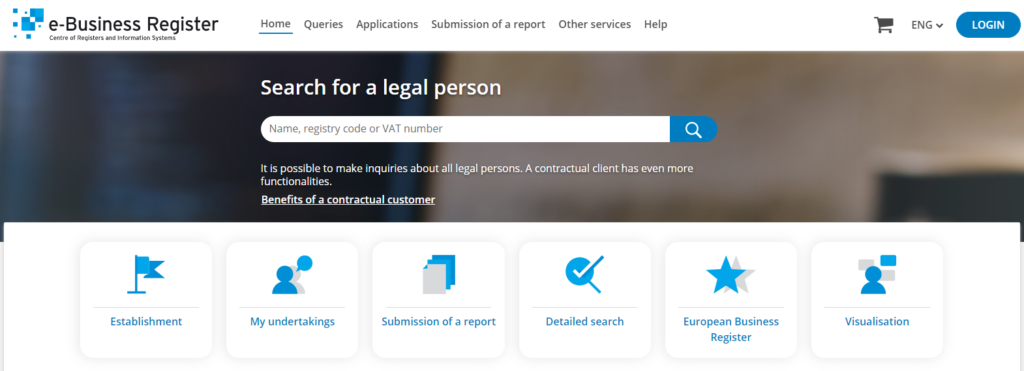
Caption: Log in to the Estonian e-Business Register and select your company.
Step 2: Open the Annual Report Environment
Navigate to the annual reporting section and select:
“Submission of a Report”
This section contains all tools required for preparing, signing, and submitting annual reports.
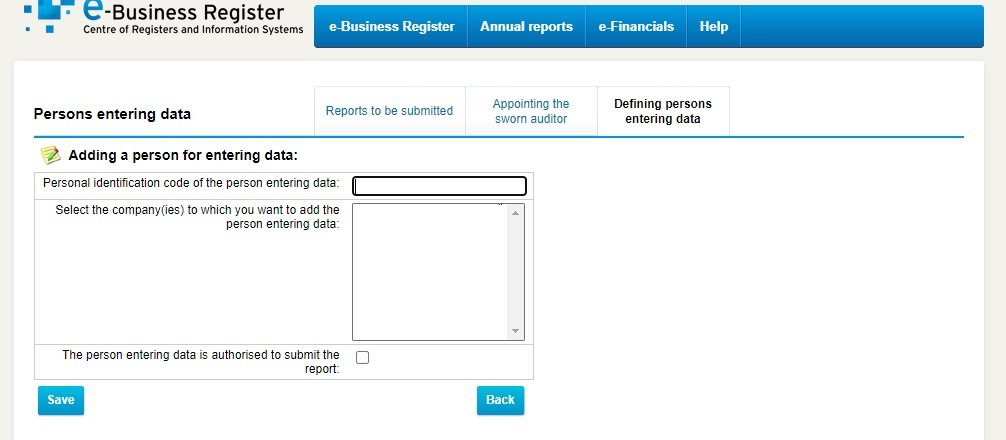
Caption: Access the annual report submission environment.
Step 3: Define Persons Entering Data
Within the reporting environment, select:
“Defining Persons Entering Data”
This option allows board members to grant access rights to accountants and other authorized individuals.
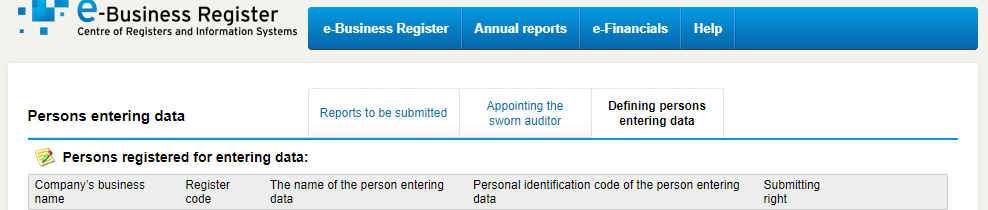
Caption: Open the section for managing annual report access rights.
Step 4: Add a New Authorized Person
Click:
“Add New Person for Entering Data”
A new authorization form will appear.
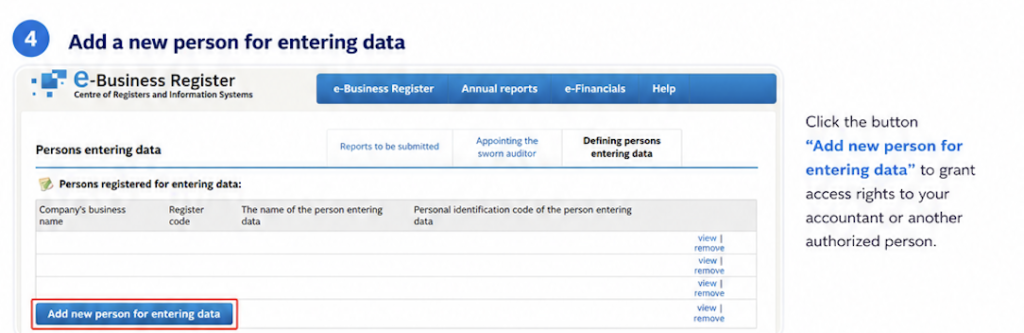
Caption: Add a new person who will assist with preparing or submitting the annual report.
Step 5: Enter the Accountant’s Details
Enter the accountant’s personal identification code and review the authorization settings.
You will see an important option:
“The person entering data is authorised to submit the report”
If this checkbox is selected, the accountant will be able not only to prepare the report but also to submit it to the Business Register after all required signatures have been collected.
If the checkbox remains unchecked, the accountant can prepare the report, but a company representative must complete the final submission.
Caption: Grant submission rights by selecting the authorization checkbox.
Step 6: Save the Authorization
After reviewing the details, click Save.
The accountant will immediately receive the assigned rights and can begin working on the annual report.
Depending on the permissions granted, the accountant may:
- Enter financial information.
- Prepare the report.
- Monitor the signing process.
- Submit the report to the Business Register.

Alternative Solution: Authorizing an Accounting Firm
Estonia has also expanded authorization options through the state portal eesti.ee and the Pääsuke authorization system.
This allows companies to authorize an accounting firm rather than an individual accountant. The accounting firm can then assign the task to the appropriate employee without requiring a new authorization every time staffing changes.
This solution is particularly useful for companies working with professional accounting service providers.
What Happens If You Miss the Annual Report Deadline?
Failure to submit an annual report may lead to:
- Warning notices from the Business Register.
- Financial penalties.
- Restrictions on company activities.
- Potential compulsory deletion from the register in severe cases.
Timely filing helps maintain your company’s good standing and demonstrates transparency to banks, partners, investors, and government authorities.
How EESTI Consulting Can Help
At EESTI Consulting, we help Estonian companies and e-residents with:
- Annual report preparation and filing
- Accounting and bookkeeping services
- Tax compliance
- Payroll administration
- Business Register filings
- E-Residency business support
Whether your company has active operations or no business activity during the financial year, our team can prepare and submit your annual report efficiently and in compliance with Estonian regulations.
Need Assistance?
Contact EESTI Consulting today to ensure your annual report is prepared accurately and submitted before the deadline.
Our specialists work with entrepreneurs and e-residents from around the world and can manage the entire annual reporting process on your behalf.
Need help with your next business step?
Book a focused 3-hour consultation with Eesti Consulting for €100.
Book a 3-hour consultation — €100